<?xml version="1.0" encoding="utf-8"?><feed xmlns="http://www.w3.org/2005/Atom" ><generator uri="https://jekyllrb.com/" version="3.10.0">Jekyll</generator><link href="https://wickeddeveloper.com/feed.xml" rel="self" type="application/atom+xml" /><link href="https://wickeddeveloper.com/" rel="alternate" type="text/html" /><updated>2024-09-12T09:28:40-06:00</updated><id>https://wickeddeveloper.com/feed.xml</id><title type="html">Wicked Developer</title><subtitle>The random musings of a software engineer living in Montana, USA.  Writing about programming, JavaScript, bitcoin, privacy, economics and philosophy.</subtitle><author><name>Luiz Lopes</name></author><entry><title type="html">Upgrading Heroku Postgres Plan</title><link href="https://wickeddeveloper.com/development/upgrade-heroku-postgresql-plan" rel="alternate" type="text/html" title="Upgrading Heroku Postgres Plan" /><published>2021-10-05T07:00:00-06:00</published><updated>2021-10-05T07:00:00-06:00</updated><id>https://wickeddeveloper.com/development/upgrade-heroku-postgresql-plan</id><content type="html" xml:base="https://wickeddeveloper.com/development/upgrade-heroku-postgresql-plan"><![CDATA[<h1 id="upgrading-heroku-postgres-plan">Upgrading Heroku Postgres Plan</h1>

<p>So you built your MVP on Heroku, you have tested your idea and it has gained tracking.  Now your hobby database is reaching its limit and 30 minutes of downtime is no longer acceptable.  You’ve decided to upgrade your database to the standard package.  How do you go about doing that with minimum downtime?</p>

<p>I’ll show you how to provision a new database, create a back up of the existing database, and how to replace your hobby database with a new database.</p>

<p>You’ll need to have the Heroku cli installed in your local machine.
Installing and configuring the cli is straightforward, but outside of the scope of this post.  You can find more information <a href="https://devcenter.heroku.com/articles/heroku-cli">here</a>.</p>

<p>Now that you have the CLI installed let’s begin.</p>

<h2 id="find-your-database-information">Find your database information</h2>

<pre><code class="language-term">heroku pg:info
</code></pre>

<p>This should return the name of the existing database (e.g. <code class="language-plaintext highlighter-rouge">DATABASE_URL</code>)</p>

<h2 id="put-the-app-into-maintenance-mode">Put the app into maintenance mode</h2>

<p>Setting the app in maintenance mode will prevent any writes to the existing database.</p>

<pre><code class="language-term">heroku maintenance:on 
</code></pre>

<p>You have to do this in so that we create a clean backup.</p>

<h2 id="create-a-backup-of-the-database">Create a backup of the database</h2>

<pre><code class="language-term">heroku pg:backups:capture DATABASE_URL --app awesome
</code></pre>

<p>While this is not necessary, it is better to have and not need, than need and not have.</p>

<h2 id="provision-the-new-database">Provision the new database</h2>

<pre><code class="language-term">heroku addons:create heroku-postgresql:standard-0
</code></pre>

<p>Wait for the database to come online, this may take a while depending on the plan you’ve selected.  In this example we’ve selected <code class="language-plaintext highlighter-rouge">standard-0</code> but there are <a href="https://devcenter.heroku.com/articles/heroku-postgres-plans">others available</a>.</p>

<h2 id="copy-data-into-the-new-database">Copy data into the new database</h2>

<p>Once the database is ready, you can copy the data from the existing database into the new database.</p>

<pre><code class="language-term">heroku pg:copy DATABASE_URL HEROKU_POSTGRESQL_GOLD_URL --app awesome
</code></pre>

<h2 id="promote-the-new-database">Promote the new database</h2>

<p>Promoting the new database will make it the primary database for the application.  You are almost done.</p>

<pre><code class="language-term">heroku pg:promote HEROKU_POSTGRESQL_GOLD_URL
</code></pre>

<h2 id="turn-maintenance-off">Turn maintenance off</h2>

<p>Allow new writes against the new database</p>

<pre><code class="language-term">heroku maintenance:off
</code></pre>

<h2 id="delete-the-old-database">Delete the old database</h2>

<p>You are now running your app against the new database, and you can erase your old database.  Keep in mind that its original name may have changed.</p>

<pre><code class="language-term">heroku addons:destroy HEROKU_POSTGRESQL_BRONZE_URL
</code></pre>

<h2 id="-congratulations">🎉 Congratulations!</h2>

<p>Your app is now running on a much better database, with less downtime and you can sleep well knowing your app is ready for more users.</p>

<h2 id="summary">Summary</h2>

<p>I have showed you</p>
<ul>
  <li>how to find your database information</li>
  <li>turn maintenance mode on</li>
  <li>create a backup</li>
  <li>provision a new database</li>
  <li>transfer data to the new database</li>
  <li>promote the new database</li>
</ul>

<h2 id="resources">Resources</h2>

<ul>
  <li><a href="https://devcenter.heroku.com/articles/upgrading-heroku-postgres-databases#upgrading-with-pg-copy">Upgrading with pg:copy</a></li>
</ul>]]></content><author><name>Luiz Lopes</name></author><category term="[&quot;development&quot;]" /><category term="heroku" /><category term="postgres" /><category term="postgresql" /><category term="database" /><category term="devops" /><summary type="html"><![CDATA[Upgrading Heroku Postgres Plan]]></summary></entry><entry><title type="html">Library vs Framework</title><link href="https://wickeddeveloper.com/development/library-vs-framework" rel="alternate" type="text/html" title="Library vs Framework" /><published>2020-07-28T18:28:39-06:00</published><updated>2020-07-28T18:28:39-06:00</updated><id>https://wickeddeveloper.com/development/library-vs-framework</id><content type="html" xml:base="https://wickeddeveloper.com/development/library-vs-framework"><![CDATA[<h1 id="what-is-the-difference-between-a-library-and-a-framework">What is the difference between a Library and a Framework?</h1>

<p>The simple answer comes from a the concept called <strong>Inversion of Control</strong>, sometimes referred to as the <em>Hollywood Principle</em>.</p>

<p>Generally speaking a library provides you with functions that you call yourself.  You as the developer are in control, you decide when to call the functions. A framework will execute your functions for you, it controls when your code gets executed — control is inverted.</p>

<h2 id="library">Library</h2>

<p>A popular library in the JavaScript ecosystem is <a href="https://jquery.com/">jQuery</a> which provides us with a number of methods (e.g. <a href="https://api.jquery.com/on/"><code class="language-plaintext highlighter-rouge">on</code></a>) that we can use to manipulate the DOM, attach callback handlers, etc. As you write your code using jQuery, you are in control of when and how your functions get executed.</p>

<div class="language-js highlighter-rouge"><div class="highlight"><pre class="highlight"><code><span class="kd">function</span> <span class="nx">handler</span> <span class="p">()</span> <span class="p">{</span>
    <span class="nx">console</span><span class="p">.</span><span class="nx">log</span><span class="p">(</span><span class="dl">"</span><span class="s2">button clicked</span><span class="dl">"</span><span class="p">);</span>
<span class="p">}</span>

<span class="nx">$</span><span class="p">(</span><span class="dl">"</span><span class="s2">button</span><span class="dl">"</span><span class="p">).</span><span class="nx">on</span><span class="p">(</span><span class="dl">"</span><span class="s2">click</span><span class="dl">"</span><span class="p">,</span> <span class="nx">handler</span><span class="p">);</span>
</code></pre></div></div>

<p>In the above example we control when <code class="language-plaintext highlighter-rouge">handler</code> gets called, whenever the <code class="language-plaintext highlighter-rouge">button</code> element gets clicked.</p>

<h2 id="framework">Framework</h2>

<p>Frameworks on the other hand are responsible for calling your code. Frameworks like <a href="https://reactjs.org/">React</a> and <a href="https://vuejs.org/">Vue.js</a> provide you with a set of instructions on how to write your code such that it can be called on by the framework themselves.</p>

<blockquote>
  <p>One important characteristic of a framework is that the methods defined by the user to tailor the framework will often be called from within the framework itself, rather than from the user’s application code. The framework often plays the role of the main program in coordinating and sequencing application activity. This inversion of control gives frameworks the power to serve as extensible skeletons. The methods supplied by the user tailor the generic algorithms defined in the framework for a particular application. <br />
—— <a href="http://www.laputan.org/drc/drc.html">Ralph Johnson and Brian Foote</a></p>
</blockquote>

<p>Let’s look an example with React.  The following is just a functional component that displays the status of an user.  It uses the <a href="https://reactjs.org/docs/hooks-reference.html#useeffect"><code class="language-plaintext highlighter-rouge">useEffect</code></a> hook to subscribe and unsubscribe to an API that checks the status of an user.  You write the code but the framework calls it during its’ reconciliation phase.</p>

<div class="language-js highlighter-rouge"><div class="highlight"><pre class="highlight"><code><span class="k">import</span> <span class="nx">React</span><span class="p">,</span> <span class="p">{</span> <span class="nx">useState</span><span class="p">,</span> <span class="nx">useEffect</span> <span class="p">}</span> <span class="k">from</span> <span class="dl">'</span><span class="s1">react</span><span class="dl">'</span><span class="p">;</span>

<span class="kd">function</span> <span class="nx">FriendStatus</span><span class="p">(</span><span class="nx">props</span><span class="p">)</span> <span class="p">{</span>
  <span class="kd">const</span> <span class="p">[</span><span class="nx">isOnline</span><span class="p">,</span> <span class="nx">setIsOnline</span><span class="p">]</span> <span class="o">=</span> <span class="nx">useState</span><span class="p">(</span><span class="kc">null</span><span class="p">);</span>

  <span class="kd">function</span> <span class="nx">handleStatusChange</span><span class="p">(</span><span class="nx">status</span><span class="p">)</span> <span class="p">{</span>
    <span class="nx">setIsOnline</span><span class="p">(</span><span class="nx">status</span><span class="p">.</span><span class="nx">isOnline</span><span class="p">);</span>
  <span class="p">}</span>

  <span class="nx">useEffect</span><span class="p">(()</span> <span class="o">=&gt;</span> <span class="p">{</span>
    <span class="c1">// this is called by the framework</span>
    <span class="nx">ChatAPI</span><span class="p">.</span><span class="nx">subscribeToFriendStatus</span><span class="p">(</span><span class="nx">props</span><span class="p">.</span><span class="nx">friend</span><span class="p">.</span><span class="nx">id</span><span class="p">,</span> <span class="nx">handleStatusChange</span><span class="p">);</span>
    <span class="k">return</span> <span class="p">()</span> <span class="o">=&gt;</span> <span class="p">{</span>
      <span class="c1">// this is also called by the framework</span>
      <span class="nx">ChatAPI</span><span class="p">.</span><span class="nx">unsubscribeFromFriendStatus</span><span class="p">(</span><span class="nx">props</span><span class="p">.</span><span class="nx">friend</span><span class="p">.</span><span class="nx">id</span><span class="p">,</span> <span class="nx">handleStatusChange</span><span class="p">);</span>
    <span class="p">};</span>
  <span class="p">});</span>

  <span class="k">if</span> <span class="p">(</span><span class="nx">isOnline</span> <span class="o">===</span> <span class="kc">null</span><span class="p">)</span> <span class="p">{</span>
    <span class="k">return</span> <span class="dl">'</span><span class="s1">Loading...</span><span class="dl">'</span><span class="p">;</span>
  <span class="p">}</span>
  <span class="k">return</span> <span class="nx">isOnline</span> <span class="p">?</span> <span class="dl">'</span><span class="s1">Online</span><span class="dl">'</span> <span class="p">:</span> <span class="dl">'</span><span class="s1">Offline</span><span class="dl">'</span><span class="p">;</span>
<span class="p">}</span>
</code></pre></div></div>

<h2 id="summary">Summary</h2>

<ul>
  <li>Inversion of Control is a key characteristic of a framework.</li>
  <li>In a library you are in control of when your code gets executed and how it gets executed.</li>
  <li>In a framework your code is executed by the framework, you build functionality that you would like the framework to execute given certain constraints.</li>
  <li>Inversion of Control is also referred to as the <em>Hollywood Principle</em>.</li>
</ul>

<h2 id="resources">Resources</h2>

<ul>
  <li><a href="https://martinfowler.com/bliki/InversionOfControl.html">InversionOfControl</a></li>
</ul>]]></content><author><name>Luiz Lopes</name></author><category term="[&quot;development&quot;]" /><category term="concepts" /><category term="library" /><category term="framework" /><category term="jquery" /><category term="react" /><category term="vue" /><category term="inversion of control" /><summary type="html"><![CDATA[What is the difference between a library and a framework? The short answer is called inversion of control.]]></summary></entry><entry><title type="html">Git Merge vs Git Rebase</title><link href="https://wickeddeveloper.com/development/git-merge-vs-git-rebase" rel="alternate" type="text/html" title="Git Merge vs Git Rebase" /><published>2020-07-23T20:31:53-06:00</published><updated>2020-07-23T20:31:53-06:00</updated><id>https://wickeddeveloper.com/development/git-merge-vs-git-rebase</id><content type="html" xml:base="https://wickeddeveloper.com/development/git-merge-vs-git-rebase"><![CDATA[<blockquote>
  <p>What is the differenct between <code class="language-plaintext highlighter-rouge">git merge</code> and <code class="language-plaintext highlighter-rouge">git rebase</code>?</p>
</blockquote>

<p>Over the years I’ve been asked this question by several people, either during an interview or by a less experienced developer on the team.</p>

<p>Atlassian’s <a href="https://www.atlassian.com/git/tutorials/merging-vs-rebasing">Merging Vs Rebasing</a> article does a fantastic job at explaining the differences and when to incorporate <code class="language-plaintext highlighter-rouge">git rebase</code> into a development workflow.  However, I wanted to recount that lesson in my own words, and that is what I hope to do in this post.</p>

<h2 id="first-things-first">First things first</h2>

<p>Both <code class="language-plaintext highlighter-rouge">git merge</code> and <code class="language-plaintext highlighter-rouge">git rebase</code> are commands you would use to integrate changes from one branch into another branch.  The main difference is that <code class="language-plaintext highlighter-rouge">git merge</code> will create a new commit in the commit history, whereas <code class="language-plaintext highlighter-rouge">git rebase</code> will not.</p>

<h2 id="merge-option">Merge Option</h2>

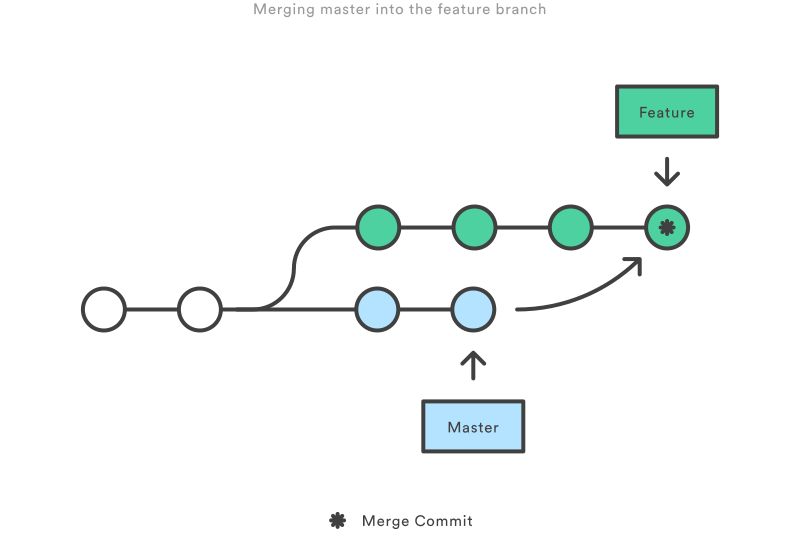
<p>Merging is the safest way to integrate changes from one branch into another branch, however it will create a new commit called “merge commit” which will tie the history of both branches together.</p>

<p>Running <code class="language-plaintext highlighter-rouge">git merge feature master</code> would result in a structure that looks like this:</p>

<p><img alt="Merging the feature branch onto master" src="/assets/images/git/merge.svg" /></p>

<p>Merging does not re-write history or changes the existing branches, this is why it is considered to be a <em>non-destructive</em> operation.</p>

<p>The one caveat with <code class="language-plaintext highlighter-rouge">git merge</code> is that while you are working on your feature, <code class="language-plaintext highlighter-rouge">master</code> can be updated with changes that you would want to incorporate into your <code class="language-plaintext highlighter-rouge">feature</code> branch. Every <code class="language-plaintext highlighter-rouge">git merge</code> command you execute will create a new “merge commit”.  This is why some people prefer to use <code class="language-plaintext highlighter-rouge">git rebase</code>.</p>

<h2 id="rebase-option">Rebase Option</h2>

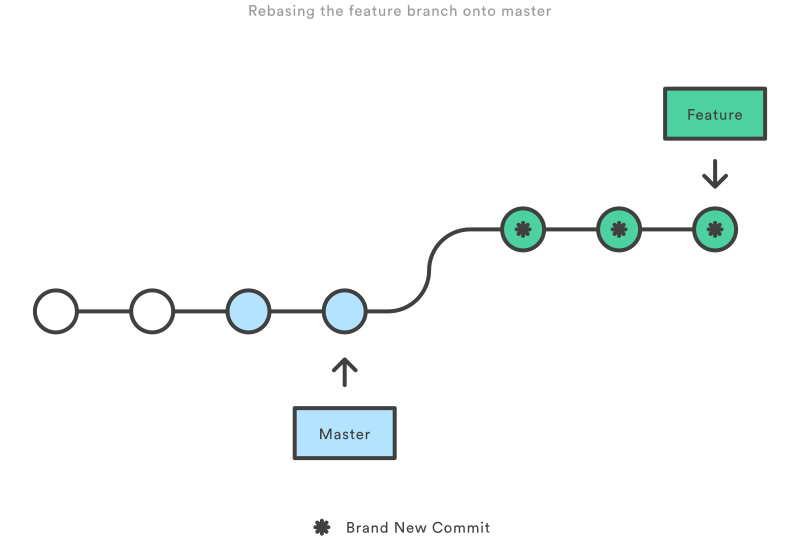
<p>Rebasing solves the same problem as merging, but it does so by re-writing the commit history of the <code class="language-plaintext highlighter-rouge">feature</code> branch. It accomplishes that by re-applying the changes in the <code class="language-plaintext highlighter-rouge">feature</code> branch onto the tip of the <code class="language-plaintext highlighter-rouge">master</code> branch.</p>

<div class="language-sh highlighter-rouge"><div class="highlight"><pre class="highlight"><code>git checkout feature
git rebase master
</code></pre></div></div>

<p><img alt="Rebasing the feature branch onto master" src="/assets/images/git/rebase.svg" /></p>

<p>As you can see this results in a much cleaner commit history, we no longer have the “merge commit” from <code class="language-plaintext highlighter-rouge">git merge</code>.  However, there are trade-offs.</p>

<ul>
  <li>You no longer have a history of when changes from <code class="language-plaintext highlighter-rouge">master</code> were integrated into the <code class="language-plaintext highlighter-rouge">feature</code>.</li>
  <li>You are prevented from pushing these changes to a remote origin if that remote origin has been changed by another user.</li>
</ul>

<p>In order to avoid the second trade-off, your team must follow <strong>The Golder Rule of Rebasing</strong>.</p>

<h2 id="the-golden-rule-of-rebasing">The Golden Rule of Rebasing</h2>

<p>You do not want to run <code class="language-plaintext highlighter-rouge">git rebase</code> on a branch that has been pushed to a remote origin where it has been worked on by more than one person.  This will cause you much pain, since <code class="language-plaintext highlighter-rouge">git rebase</code> will re-write the commit history of that branch.</p>

<blockquote>
  <p>“Is anyone else looking at this branch?” If the answer is yes, take your hands off the keyboard and start thinking about a non-destructive way to make your changes</p>
</blockquote>

<h2 id="summary">Summary</h2>

<ul>
  <li><code class="language-plaintext highlighter-rouge">git rebase</code> and <code class="language-plaintext highlighter-rouge">git merge</code> are two ways of performing the same task of integrating changes from one branch into another.</li>
  <li><code class="language-plaintext highlighter-rouge">git merge</code> is the safest and easiest way to accomplish that task.</li>
  <li><code class="language-plaintext highlighter-rouge">git merge</code> will create a new “merge commit”, which can create noise in the commit history.</li>
  <li><code class="language-plaintext highlighter-rouge">git rebase</code> can be used to keep a cleaner commit history, but it comes with trade-offs.</li>
  <li>Your team must follow <strong>The Golder Rule of Rebasing</strong> if you are going to be using <code class="language-plaintext highlighter-rouge">git rebase</code> in your workflow.</li>
  <li><strong>DO NOT</strong> execute <code class="language-plaintext highlighter-rouge">git rebase</code> on a branch that has been made public, especially if others have contributed to that branch.</li>
</ul>

<blockquote>
  <p>If you get stuck there is always <a href="https://ohshitgit.com/">oh Shit, Git!?!</a></p>
</blockquote>

<h2 id="resources">Resources</h2>

<ul>
  <li><a href="https://www.atlassian.com/git/tutorials/merging-vs-rebasing">Atlassian Merging Vs Rebasing</a></li>
</ul>

<h2 id="license">License</h2>

<p>This page has borrowed some of the images of the <a href="https://www.atlassian.com/git/tutorials/merging-vs-rebasing">Atlassian Merging Vs Rebasing</a> article which are licensed under <a href="https://creativecommons.org/licenses/by/2.5/au/">CC BY 2.5 AU</a>.</p>]]></content><author><name>Luiz Lopes</name></author><category term="[&quot;development&quot;]" /><category term="git" /><category term="workflow" /><summary type="html"><![CDATA[A quick review of the differences between git rebase and git merge, and recommendations on when to use them.]]></summary></entry><entry><title type="html">JavaScript Custom Events</title><link href="https://wickeddeveloper.com/development/javascript-custom-events" rel="alternate" type="text/html" title="JavaScript Custom Events" /><published>2020-07-06T17:32:53-06:00</published><updated>2020-07-06T17:32:53-06:00</updated><id>https://wickeddeveloper.com/development/javascript-custom-events</id><content type="html" xml:base="https://wickeddeveloper.com/development/javascript-custom-events"><![CDATA[<p>Modern web applications rely a lot on JavaScript, and different elements on a page may need to communicate with other elements.  What happens if those elements are rendered by separate codebases, how would you “connect” them? A valid solution could be found in <a href="https://developer.mozilla.org/en-US/docs/Web/Guide/Events/Creating_and_triggering_events#Creating_custom_events"><code class="language-plaintext highlighter-rouge">CustomEvent</code></a>.  This API allows us to create our own events that pass the data we need, and we can use <a href="https://developer.mozilla.org/en-US/docs/Web/API/EventTarget/addEventListener"><code class="language-plaintext highlighter-rouge">addEventListener</code></a> throughout our app in order to execute some piece of code based on our custom event.</p>

<h3 id="customevent"><code class="language-plaintext highlighter-rouge">CustomEvent</code></h3>

<p>The <code class="language-plaintext highlighter-rouge">CustomEvent</code> API is fairly straight forward:</p>

<div class="language-js highlighter-rouge"><div class="highlight"><pre class="highlight"><code><span class="kd">const</span> <span class="nx">item</span> <span class="o">=</span> <span class="dl">'</span><span class="s1">book</span><span class="dl">'</span>
<span class="kd">const</span> <span class="nx">customItemSelectedEvent</span> <span class="o">=</span> <span class="k">new</span> <span class="nx">CustomEvent</span><span class="p">(</span>
    <span class="dl">'</span><span class="s1">custom:item-selected</span><span class="dl">'</span><span class="p">,</span> 
    <span class="p">{</span> 
        <span class="na">detail</span><span class="p">:</span> <span class="p">{</span> 
            <span class="nx">item</span> 
        <span class="p">}</span>
    <span class="p">})</span>
</code></pre></div></div>

<p>In the code above we create a custom event with the name <code class="language-plaintext highlighter-rouge">custom:item-selected</code>.  I generally like to namespace my events following a <code class="language-plaintext highlighter-rouge">:</code> so as to not cause any conflicts with any other 3rd party library. We are passing an <code class="language-plaintext highlighter-rouge">item</code> property in the <a href="https://developer.mozilla.org/en-US/docs/Web/API/CustomEvent/detail"><code class="language-plaintext highlighter-rouge">detail</code></a> property so that any consuming listener may have access to the value of <code class="language-plaintext highlighter-rouge">item</code>.  One use case for this is when <code class="language-plaintext highlighter-rouge">item</code> is something that the enduser controls, say a list of items displayed on the page.</p>

<h3 id="dispatchevent"><code class="language-plaintext highlighter-rouge">dispatchEvent</code></h3>

<p>Once our <code class="language-plaintext highlighter-rouge">customItemSelectedEvent</code> is created, we need to fire it.  Firing a custom event is as simple as attaching it to an <code class="language-plaintext highlighter-rouge">HTMLElement</code> and calling the <a href="https://developer.mozilla.org/en-US/docs/Web/API/EventTarget/dispatchEvent"><code class="language-plaintext highlighter-rouge">dispatchEvent</code></a> method on that <code class="language-plaintext highlighter-rouge">HTMLElement</code>.</p>

<div class="language-js highlighter-rouge"><div class="highlight"><pre class="highlight"><code><span class="kd">const</span> <span class="nx">item</span> <span class="o">=</span> <span class="dl">'</span><span class="s1">book</span><span class="dl">'</span>
<span class="kd">const</span> <span class="nx">customItemSelectedEvent</span> <span class="o">=</span> <span class="k">new</span> <span class="nx">CustomEvent</span><span class="p">(</span>
    <span class="dl">'</span><span class="s1">custom:item-selected</span><span class="dl">'</span><span class="p">,</span> 
    <span class="p">{</span> 
        <span class="na">detail</span><span class="p">:</span> <span class="p">{</span> 
            <span class="nx">item</span> 
        <span class="p">}</span>
    <span class="p">})</span>

<span class="kd">const</span> <span class="nx">el</span> <span class="o">=</span> <span class="nb">document</span><span class="p">.</span><span class="nx">querySelector</span><span class="p">(</span><span class="dl">'</span><span class="s1">.items</span><span class="dl">'</span><span class="p">)</span>

<span class="nx">el</span><span class="p">.</span><span class="nx">dispatchEvent</span><span class="p">(</span><span class="nx">customItemSelectedEvent</span><span class="p">)</span>
</code></pre></div></div>

<p>In the example above we dispatch our <code class="language-plaintext highlighter-rouge">customItemSelectedEvent</code> on a hypothetical <code class="language-plaintext highlighter-rouge">HTMLElement</code> with a css class named <code class="language-plaintext highlighter-rouge">items</code>.</p>

<h3 id="addeventlistener"><code class="language-plaintext highlighter-rouge">addEventListener</code></h3>

<p>Consuming a custom event is no different than consuming any other <code class="language-plaintext highlighter-rouge">Event</code>.  We simply add a listener on the <code class="language-plaintext highlighter-rouge">HTMLElement</code> that we trigerred the <code class="language-plaintext highlighter-rouge">CustomEvent</code> on, in our case <code class="language-plaintext highlighter-rouge">.items</code>.</p>

<div class="language-js highlighter-rouge"><div class="highlight"><pre class="highlight"><code><span class="c1">// some other file</span>

<span class="kd">const</span> <span class="nx">el</span> <span class="o">=</span> <span class="nb">document</span><span class="p">.</span><span class="nx">querySelector</span><span class="p">(</span><span class="dl">'</span><span class="s1">.items</span><span class="dl">'</span><span class="p">)</span>
<span class="nx">el</span><span class="p">.</span><span class="nx">addEventListener</span><span class="p">(</span><span class="dl">'</span><span class="s1">custom:item-selected</span><span class="dl">'</span><span class="p">,</span> <span class="p">(</span><span class="nx">e</span><span class="p">)</span> <span class="o">=&gt;</span> <span class="p">{</span>
    <span class="nx">console</span><span class="p">.</span><span class="nx">debug</span><span class="p">(</span><span class="dl">'</span><span class="s1">Selected Item:</span><span class="dl">'</span><span class="p">,</span> <span class="nx">e</span><span class="p">.</span><span class="nx">detail</span><span class="p">)</span>
<span class="p">})</span>

</code></pre></div></div>

<p>That is pretty much it, those are the steps for creating your custom event.  I’ve used this pattern whenever building a custom library for a project, or whenever an application I am working in has two separate codebases (e.g. legacy JavaScript files using bootstrap, and new files using React.)</p>]]></content><author><name>Luiz Lopes</name></author><category term="[&quot;development&quot;]" /><category term="javascript" /><category term="tutorial" /><summary type="html"><![CDATA[A quick look at how to use JavaScript CustomEvent object to create and consume custom events, so that different parts of an application can communicate with one another.]]></summary></entry><entry><title type="html">A case for expression reduction</title><link href="https://wickeddeveloper.com/development/a-case-for-expression-reduction" rel="alternate" type="text/html" title="A case for expression reduction" /><published>2020-04-19T00:10:00-06:00</published><updated>2020-04-19T00:10:00-06:00</updated><id>https://wickeddeveloper.com/development/a-case-for-expression-reduction</id><content type="html" xml:base="https://wickeddeveloper.com/development/a-case-for-expression-reduction"><![CDATA[<p>As a software developer you will inevitably have to debug some piece of code you wrote months if not years ago, or code from a colleague that is no longer part of your team.  As you step through some routine you notice an array of conditional statements with complicated conditional expressions. As you search for the bug in the code you’ll end up noticing that you can’t hold all of the values in your head.  You can no longer remember what a particular value means or what it points to.</p>

<p>I have found that creating boolean variables that hold the value of an expensive or complicated expression makes it easier to read and understand code.</p>

<p>Let’s look at a trivial piece of code, written in JavaScript, and see how assigning complex conditions to a variable makes it much easier to understand and read the code. <em>Keep in mind this code is not something you’d use in production, I’m only using this to illustrate the point.</em></p>

<p>Suppose there is a <code class="language-plaintext highlighter-rouge">function</code> that takes an argument called <code class="language-plaintext highlighter-rouge">drink</code> and inside of this function we check what type of drink it is and return an emoji of a coffee, tea, or milk.</p>

<div class="language-js highlighter-rouge"><div class="highlight"><pre class="highlight"><code><span class="cm">/* Assume COFFEE, CAFE, LATE, MOCHA, TEA, etc are imported into this module. */</span>

<span class="kd">function</span> <span class="nx">getDrinkEmoji</span><span class="p">(</span><span class="nx">drink</span><span class="p">)</span> <span class="p">{</span>
    <span class="k">if</span> <span class="p">(</span><span class="nx">drink</span> <span class="o">===</span> <span class="nx">COFFEE</span> <span class="o">||</span> 
        <span class="nx">drink</span> <span class="o">===</span> <span class="nx">CAFE</span> <span class="o">||</span> 
        <span class="nx">drink</span> <span class="o">===</span> <span class="nx">LATE</span> <span class="o">||</span> 
        <span class="nx">drink</span> <span class="o">===</span> <span class="nx">MOCHA</span><span class="p">)</span> <span class="p">{</span>
        <span class="k">return</span> <span class="dl">'</span><span class="s1">☕</span><span class="dl">'</span><span class="p">;</span>
    <span class="p">}</span> <span class="k">else</span> <span class="k">if</span> <span class="p">(</span><span class="nx">drink</span> <span class="o">===</span> <span class="nx">TEA</span> <span class="o">||</span> 
               <span class="nx">drink</span> <span class="o">===</span> <span class="nx">BLACK_TEA</span> <span class="o">||</span> 
               <span class="nx">drink</span> <span class="o">===</span> <span class="nx">GREEN_TEA</span> <span class="o">||</span> 
               <span class="nx">drink</span> <span class="o">===</span> <span class="nx">OOLONG_TEA</span><span class="p">)</span> <span class="p">{</span>
        <span class="k">return</span> <span class="dl">'</span><span class="s1">🍵</span><span class="dl">'</span><span class="p">;</span>
    <span class="p">}</span> <span class="k">else</span> <span class="p">{</span>
        <span class="k">return</span> <span class="dl">'</span><span class="s1">🥛</span><span class="dl">'</span><span class="p">;</span>
    <span class="p">}</span>
<span class="p">}</span>
</code></pre></div></div>

<p>Reading through code like that requires you to hold quite a lot in your head.</p>

<p>Now let’s look at the same code but having assigned the expression to a variable.</p>

<div class="language-js highlighter-rouge"><div class="highlight"><pre class="highlight"><code><span class="kd">function</span> <span class="nx">getDrinkEmoji</span><span class="p">(</span><span class="nx">drink</span><span class="p">)</span> <span class="p">{</span>
    <span class="kd">const</span> <span class="nx">isCoffee</span> <span class="o">=</span> <span class="nx">drink</span> <span class="o">===</span> <span class="nx">COFFEE</span> <span class="o">||</span> 
                     <span class="nx">drink</span> <span class="o">===</span> <span class="nx">CAFE</span> <span class="o">||</span> 
                     <span class="nx">drink</span> <span class="o">===</span> <span class="nx">LATE</span> <span class="o">||</span> 
                     <span class="nx">drink</span> <span class="o">===</span> <span class="nx">MOCHA</span><span class="p">;</span>
    <span class="kd">const</span> <span class="nx">isTea</span> <span class="o">=</span> <span class="nx">drink</span> <span class="o">===</span> <span class="nx">TEA</span> <span class="o">||</span> 
                  <span class="nx">drink</span> <span class="o">===</span> <span class="nx">BLACK_TEA</span> <span class="o">||</span> 
                  <span class="nx">drink</span> <span class="o">===</span> <span class="nx">GREEN_TEA</span> <span class="o">||</span> 
                  <span class="nx">drink</span> <span class="o">===</span> <span class="nx">OOLONG_TEA</span><span class="p">;</span>

    <span class="k">if</span> <span class="p">(</span><span class="nx">isCoffee</span><span class="p">)</span> <span class="p">{</span>
        <span class="k">return</span> <span class="dl">'</span><span class="s1">☕</span><span class="dl">'</span><span class="p">;</span>
    <span class="p">}</span> <span class="k">else</span> <span class="k">if</span> <span class="p">(</span><span class="nx">isTea</span><span class="p">)</span> <span class="p">{</span>
        <span class="k">return</span> <span class="dl">'</span><span class="s1">🍵</span><span class="dl">'</span><span class="p">;</span>
    <span class="p">}</span> <span class="k">else</span> <span class="p">{</span>
        <span class="k">return</span> <span class="dl">'</span><span class="s1">🥛</span><span class="dl">'</span><span class="p">;</span>
    <span class="p">}</span>
<span class="p">}</span>
</code></pre></div></div>

<p>Here we can more quickly understand what the expressions inside of the <code class="language-plaintext highlighter-rouge">if</code> and <code class="language-plaintext highlighter-rouge">else if</code> are evaluating to.</p>

<div class="notice--info">
:pushpin: You may also prefix your variables with words like <code>has</code>, <code>should</code>, <code>was</code>, etc.
</div>

<p>This pattern makes a lot of sense when you find yourself evaluating the condition multiple times.  When you do it once you can just reference the variable again when you need it.</p>

<p>In this next example, our <code class="language-plaintext highlighter-rouge">function</code> receives an array of <code class="language-plaintext highlighter-rouge">drinks</code>, we use the <a href="https://devdocs.io/javascript/global_objects/array/some"><code class="language-plaintext highlighter-rouge">Array.some</code></a> method to test whether the <code class="language-plaintext highlighter-rouge">drinks</code> include a coffee or a tea and then return an emoji.</p>

<div class="language-js highlighter-rouge"><div class="highlight"><pre class="highlight"><code><span class="kd">function</span> <span class="nx">getDrinksEmoji</span><span class="p">(</span><span class="nx">drinks</span><span class="p">)</span> <span class="p">{</span>
    <span class="kd">const</span> <span class="nx">hasCoffee</span> <span class="o">=</span> <span class="nx">drinks</span><span class="p">.</span><span class="nx">some</span><span class="p">(</span><span class="nx">drink</span> <span class="o">=&gt;</span> <span class="nx">drink</span> <span class="o">===</span> <span class="nx">COFFEE</span> <span class="o">||</span> 
                                           <span class="nx">drink</span> <span class="o">===</span> <span class="nx">CAFE</span> <span class="o">||</span> 
                                           <span class="nx">drink</span> <span class="o">===</span> <span class="nx">LATE</span> <span class="o">||</span> 
                                           <span class="nx">drink</span> <span class="o">===</span> <span class="nx">MOCHA</span><span class="p">);</span>
    <span class="kd">const</span> <span class="nx">hasTea</span> <span class="o">=</span> <span class="nx">drinks</span><span class="p">.</span><span class="nx">some</span><span class="p">(</span><span class="nx">drink</span> <span class="o">=&gt;</span> <span class="nx">drink</span> <span class="o">===</span> <span class="nx">TEA</span> <span class="o">||</span>
                                        <span class="nx">drink</span> <span class="o">===</span> <span class="nx">BLACK_TEA</span> <span class="o">||</span> 
                                        <span class="nx">drink</span> <span class="o">===</span> <span class="nx">GREEN_TEA</span> <span class="o">||</span> 
                                        <span class="nx">drink</span> <span class="o">===</span> <span class="nx">OOLONG_TEA</span><span class="p">);</span>
    <span class="kd">const</span> <span class="nx">hasCoffeeAndTea</span> <span class="o">=</span> <span class="nx">hasCoffee</span> <span class="o">&amp;&amp;</span> <span class="nx">hasTea</span><span class="p">;</span>

    <span class="k">if</span> <span class="p">(</span><span class="nx">hasCoffeeAndTea</span><span class="p">)</span> <span class="p">{</span>
        <span class="k">return</span> <span class="dl">'</span><span class="s1">☕ + 🍵</span><span class="dl">'</span><span class="p">;</span>
    <span class="p">}</span> <span class="k">else</span> <span class="k">if</span> <span class="p">(</span><span class="nx">hasCoffee</span><span class="p">)</span> <span class="p">{</span>
        <span class="k">return</span> <span class="dl">'</span><span class="s1">☕</span><span class="dl">'</span><span class="p">;</span>
    <span class="p">}</span> <span class="k">else</span> <span class="k">if</span> <span class="p">(</span><span class="nx">hasTea</span><span class="p">)</span> <span class="p">{</span>
        <span class="k">return</span> <span class="dl">'</span><span class="s1">🍵</span><span class="dl">'</span><span class="p">;</span>
    <span class="p">}</span> <span class="k">else</span> <span class="p">{</span>
        <span class="k">return</span> <span class="dl">'</span><span class="s1">🥛</span><span class="dl">'</span><span class="p">;</span>
    <span class="p">}</span>
<span class="p">}</span>
</code></pre></div></div>

<p>We had to execute the expensive computation of testing if the <code class="language-plaintext highlighter-rouge">drinks</code> include a coffee or tea once, we referenced that expression multiple times in our code without additional performance penalty, and the code is still easy to read and understand.</p>

<h2 id="conclusion">Conclusion</h2>

<p>Conditional statements are an invaluable tools in software development, they provide us with flow control to determine the output of our programs.  You’ll inevitably run across them when writing and reading code.  If you are the author of the code, or reading code that you have control over, do yourself a favor and assign your expensive and complicated condition statements to variables with meaningful names.  Doing so will free up space in your head and your code will be much easier to read and understand.</p>

<h2 id="links">Links</h2>

<ul>
  <li><a href="https://javascript.info/ifelse">JavaScript — Conditional Operators</a></li>
  <li><a href="https://en.wikipedia.org/wiki/Conditional_(computer_programming)">Conditional (computer programming)</a></li>
  <li><a href="https://www.digitalocean.com/community/tutorials/how-to-write-conditional-statements-in-javascript">How To Write Conditional Statements in JavaScript</a></li>
  <li><a href="https://cal-linux.com/tutorials/conditionals.html">Conditional Execution in C++</a></li>
  <li><a href="https://en.wikipedia.org/wiki/Predicate_%28mathematical_logic%29">Predicate (mathematical logic)</a></li>
</ul>

<hr />

<p><strong>Thanks</strong> to Greg Timmerman, and @nicholascloud for reading a draft of this post. @nicholascloud also gave this pattern a name (<em>expression reduction</em>).</p>]]></content><author><name>Luiz Lopes</name></author><category term="[&quot;development&quot;]" /><category term="javascript" /><category term="opinion" /><summary type="html"><![CDATA[A case for assigning complex condition statements to a variable, so that your code becomes easier to grok.]]></summary></entry><entry><title type="html">Build a simple calculator</title><link href="https://wickeddeveloper.com/development/build-a-simple-calculator" rel="alternate" type="text/html" title="Build a simple calculator" /><published>2020-04-13T05:08:00-06:00</published><updated>2020-04-13T05:08:00-06:00</updated><id>https://wickeddeveloper.com/development/build-a-simple-calculator</id><content type="html" xml:base="https://wickeddeveloper.com/development/build-a-simple-calculator"><![CDATA[<p>The following is my solution to a coding challenge I’ve come across.  I’ve implemented it in JavaScript since that is the language I am most comfortable with at the moment.</p>

<h2 id="problem">Problem</h2>

<p>You are building an educational website and want to create a simple calculator for students to use. The calculator will only allow addition and subtraction of non-negative integers.</p>

<p>Given an expression string using the “+”, “-“ operators like “5+16-2”, write a function to parse the string and evaluate the result.</p>

<h2 id="constraints">Constraints</h2>

<ul>
  <li>Only allow addition and subtraction of non-negative integers.</li>
</ul>

<h2 id="solution">Solution</h2>

<div class="language-js highlighter-rouge"><div class="highlight"><pre class="highlight"><code><span class="kd">const</span> <span class="nx">calculate</span> <span class="o">=</span> <span class="p">(</span><span class="nx">expression</span><span class="p">)</span> <span class="o">=&gt;</span> <span class="p">{</span>
  <span class="kd">const</span> <span class="nx">numbers</span> <span class="o">=</span> <span class="nx">expression</span><span class="p">.</span><span class="nx">split</span><span class="p">(</span><span class="sr">/</span><span class="se">[</span><span class="sr">+,-</span><span class="se">]</span><span class="sr">/</span><span class="p">).</span><span class="nx">map</span><span class="p">(</span><span class="nx">n</span> <span class="o">=&gt;</span> <span class="nb">Number</span><span class="p">(</span><span class="nx">n</span><span class="p">));</span> <span class="c1">// transform String into Number</span>
  <span class="kd">const</span> <span class="nx">operators</span> <span class="o">=</span> <span class="nx">expression</span><span class="p">.</span><span class="nx">split</span><span class="p">(</span><span class="sr">/</span><span class="se">\d</span><span class="sr">/</span><span class="p">).</span><span class="nx">filter</span><span class="p">(</span><span class="nx">op</span> <span class="o">=&gt;</span> <span class="nx">op</span> <span class="o">!==</span> <span class="dl">''</span><span class="p">);</span>
  <span class="kd">let</span> <span class="nx">result</span> <span class="o">=</span> <span class="mi">0</span><span class="p">;</span>

  <span class="c1">// perform calculation</span>
  <span class="nx">numbers</span><span class="p">.</span><span class="nx">forEach</span><span class="p">((</span><span class="nx">number</span><span class="p">,</span> <span class="nx">id</span><span class="p">)</span> <span class="o">=&gt;</span> <span class="p">{</span>
    <span class="kd">const</span> <span class="nx">operator</span> <span class="o">=</span> <span class="nx">id</span> <span class="o">===</span> <span class="mi">0</span> <span class="p">?</span> <span class="dl">''</span> <span class="p">:</span> <span class="nx">operators</span><span class="p">[</span><span class="nx">id</span> <span class="o">-</span> <span class="mi">1</span><span class="p">];</span> <span class="c1">// no operator to apply to first number</span>
    <span class="k">switch</span> <span class="p">(</span><span class="nx">operator</span><span class="p">)</span> <span class="p">{</span>
      <span class="k">case</span> <span class="dl">'</span><span class="s1">+</span><span class="dl">'</span><span class="p">:</span>
        <span class="nx">result</span> <span class="o">=</span> <span class="nx">result</span> <span class="o">+</span> <span class="nx">number</span><span class="p">;</span>
        <span class="k">break</span><span class="p">;</span>
      <span class="k">case</span> <span class="dl">'</span><span class="s1">-</span><span class="dl">'</span><span class="p">:</span>
        <span class="nx">result</span> <span class="o">=</span> <span class="nx">result</span> <span class="o">-</span> <span class="nx">number</span><span class="p">;</span>
        <span class="k">break</span><span class="p">;</span>
      <span class="nl">default</span><span class="p">:</span>
        <span class="nx">result</span> <span class="o">=</span> <span class="nx">number</span><span class="p">;</span>
    <span class="p">}</span>
  <span class="p">});</span>

  <span class="k">return</span> <span class="nx">result</span><span class="p">;</span>
<span class="p">};</span>
</code></pre></div></div>

<p><a href="https://jsbin.com/qacanoy/edit?js,console">Try it</a></p>

<h3 id="explanation">Explanation</h3>

<p>Given the constraints we are working with, I can build my <code class="language-plaintext highlighter-rouge">calculate</code> function without having to check for negative numbers, and mathematical expressions that do not involve integers.</p>

<p>My first task is to figure out what numbers we are operating on, so I use <a href="https://devdocs.io/javascript/global_objects/string/split"><code class="language-plaintext highlighter-rouge">String.split</code></a> to separate the full expression into substrings of just the numbers by passing the regular expression (<code class="language-plaintext highlighter-rouge">/[+,-]/</code>) as the <code class="language-plaintext highlighter-rouge">separator</code> parameter. Since <code class="language-plaintext highlighter-rouge">split()</code> returns an <code class="language-plaintext highlighter-rouge">Array</code> of strings, I can call the <a href="https://devdocs.io/javascript/global_objects/array/map"><code class="language-plaintext highlighter-rouge">Array.map</code></a> method to transform my <code class="language-plaintext highlighter-rouge">Array</code> of strings into an array of <code class="language-plaintext highlighter-rouge">Numbers</code>.  This will allow me to operate on the numbers.</p>

<p>In order to get the list of operators from the expression, I use us <code class="language-plaintext highlighter-rouge">split</code> again, but this time I pass the regular expression (<code class="language-plaintext highlighter-rouge">\d</code>) as the <code class="language-plaintext highlighter-rouge">separator</code> parameter. I am basically telling <code class="language-plaintext highlighter-rouge">split</code> to build a new array using integers as the breaking point.  The result of which is passed to a <a href="https://devdocs.io/javascript/global_objects/array/filter"><code class="language-plaintext highlighter-rouge">Array.filter</code></a> so that I can clean up all of the blank array elements.</p>

<p>At this point I should have everything I need to evaluate the expression passed into <code class="language-plaintext highlighter-rouge">calculate</code>.</p>

<p>I’ll use <a href="https://devdocs.io/javascript/global_objects/array/foreach"><code class="language-plaintext highlighter-rouge">Array.forEach</code></a> to perform an operation on each of the integers in the given expression.  Inside of the <code class="language-plaintext highlighter-rouge">forEach</code> callback method I’ll grab the <code class="language-plaintext highlighter-rouge">operator</code> from the list of <code class="language-plaintext highlighter-rouge">operators</code> with one caveat.  I do not want to use the first operator on the first <code class="language-plaintext highlighter-rouge">number</code> from the <code class="language-plaintext highlighter-rouge">numbers</code> array. We’ll perform the operations after the first number, so that we have an accurate result.</p>

<p>Since the <code class="language-plaintext highlighter-rouge">operator</code> is of type <code class="language-plaintext highlighter-rouge">String</code> I cannot use that to calculate an expression (e.g. <code class="language-plaintext highlighter-rouge">1 + 1</code>), because the <code class="language-plaintext highlighter-rouge">+</code> will be treated as a string.  I’ll use a <code class="language-plaintext highlighter-rouge">switch</code> statement and map the string <code class="language-plaintext highlighter-rouge">+</code> with the <a href="https://devdocs.io/javascript/operators/arithmetic_operators#Unary_plus">Unary plus</a>, and will do the same for the <code class="language-plaintext highlighter-rouge">-</code> with the <a href="https://devdocs.io/javascript/operators/arithmetic_operators#Subtraction">Subtraction</a> operator. My <code class="language-plaintext highlighter-rouge">default</code> case assigns <code class="language-plaintext highlighter-rouge">result</code> to <code class="language-plaintext highlighter-rouge">number</code> since this will be the first number in the expression.</p>

<p>That is about it, once we’ve iterated over all of the numbers in the expression, we return the result.</p>]]></content><author><name>Luiz Lopes</name></author><category term="[&quot;development&quot;]" /><category term="challenge" /><category term="javascript" /><category term="code challenge" /><summary type="html"><![CDATA[A solution to a coding challenge where you are asked to build a simple calculator function that takes a mathematical expression and returns the result of the expression.]]></summary></entry><entry><title type="html">Alternatives to Zoom</title><link href="https://wickeddeveloper.com/privacy/alternatives-to-zoom" rel="alternate" type="text/html" title="Alternatives to Zoom" /><published>2020-04-06T07:47:00-06:00</published><updated>2020-04-06T07:47:00-06:00</updated><id>https://wickeddeveloper.com/privacy/alternatives-to-zoom</id><content type="html" xml:base="https://wickeddeveloper.com/privacy/alternatives-to-zoom"><![CDATA[<p>Over the past few weeks businesses and people have been scrambling to adjust to a work from home way of life.  People went searching for ways to communicate with colleagues and family over video calls.  A large number of these people resorted to using Zoom as their video conferencing application.  Unfortunately, <a href="https://www.forbes.com/sites/kateoflahertyuk/2020/04/04/new-zoom-user-blow-this-is-how-thousands-of-video-chats-are-available-for-anyone-to-view-online/#7dd5c381785d">security researchers</a> have exposed many <a href="https://theintercept.com/2020/04/03/zooms-encryption-is-not-suited-for-secrets-and-has-surprising-links-to-china-researchers-discover/">flaws</a> in Zoom’s application(s).</p>

<p>The following are some alternatives for those who value security and privacy.  These services use a web technology called WebRTC, which provides peer-to-peer encryption out of the box. If your team or group of friends is small you can use the following alternatives without sending sensitive information to a server.  Once you exceed a certain number of participants different services will begin to route traffic through a server.</p>

<h2 id="dailyco">Daily.co</h2>

<p><a href="https://daily.co">Daily.co</a> offers easy, flexible in-browser video calls that run in your web browser. There is no software to download. When you sign up for their free plan, you can start calls on the browser with up to 50 participants.  When there are 4 or fewer people on the call all traffic is routed between the participants.  Once more participants join the call, there are bandwidth limitations which causes the services to switch from p2p to relayed connections. It first tries to send UDP traffic through their servers, if that fails it switches to TCP-tunneling, while preserving encryption to and from the server</p>

<p>You can read more about how daily.co handles privacy in this <a href="https://help.daily.co/en/articles/1189715-peer-to-peer-vs-cloud-meetings-bandwidth-privacy-and-architecture">post</a>.</p>

<h2 id="whereby">Whereby</h2>

<p><a href="https://whereby.com/">Whereby</a> is another service that offers in-browser video calls. Their free version can support up to 4 participants, and you have access to 1 meeting room.  They are a European company and might be a better option for those in the E.U. It does seem like chat messages do pass through their servers before reaching the other participants.</p>

<p>Read more about their data storage and security <a href="https://whereby.helpscoutdocs.com/article/334-data-storage-security">here</a>.</p>

<h2 id="jitsi">Jitsi</h2>

<p>For those of us who are a little more technical, <a href="https://jitsi.org/">jitsi</a> offers an open-source video conferencing platform that you can install in your own server.  The whole project is available on <a href="https://github.com/jitsi">GitHub</a>.  If you feel like rolling your own solution, this is the way to go.</p>

<h2 id="resources">Resources</h2>

<ul>
  <li><a href="https://webrtc.org/">WebRTC</a></li>
  <li><a href="https://tools.ietf.org/html/draft-ietf-rtcweb-security-arch-20">WebRTC Security Architecture</a></li>
</ul>]]></content><author><name>Luiz Lopes</name></author><category term="privacy" /><category term="privacy" /><category term="video" /><category term="security" /><category term="cybersecurity" /><category term="webrtc" /><summary type="html"><![CDATA[Alternatives to Zoom video conferencing app for people who care about privacy and security.]]></summary></entry><entry><title type="html">How I Manage My ZSH Plugins</title><link href="https://wickeddeveloper.com/development/how-i-manage-my-zsh-plugins" rel="alternate" type="text/html" title="How I Manage My ZSH Plugins" /><published>2020-03-30T09:00:00-06:00</published><updated>2020-03-30T09:00:00-06:00</updated><id>https://wickeddeveloper.com/development/how-i-manage-my-zsh-plugins</id><content type="html" xml:base="https://wickeddeveloper.com/development/how-i-manage-my-zsh-plugins"><![CDATA[<p>I am a big fan of <a href="https://en.wikipedia.org/wiki/Z_shell"><code class="language-plaintext highlighter-rouge">zsh</code></a>, so much so that part of my <a href="https://github.com/theprivileges/shared-dotfiles/blob/62a21d589b5dca595096757b70819161dcb86432/tag-mac/bootstrap#L42">setup script</a> contains instructions to install it and set it as the default shell.</p>

<p>One of the biggest advantages of using <code class="language-plaintext highlighter-rouge">zsh</code> are the plugins and functions that you can use to amplify your terminal powers.  I’ve been using <a href="https://ohmyz.sh/"><code class="language-plaintext highlighter-rouge">oh-my-zsh</code></a> to manage my <code class="language-plaintext highlighter-rouge">zsh</code> configuration, and recently I started using <a href="https://github.com/zplug/zplug"><code class="language-plaintext highlighter-rouge">zplug</code></a> to manage all of the plugins and customizations I use.</p>

<h2 id="a-next-generation-plugin-manager-for-zsh">A next-generation plugin manager for zsh</h2>

<p><code class="language-plaintext highlighter-rouge">zplug</code> offers an intuitive and fast way to manage everything I rely on when using <code class="language-plaintext highlighter-rouge">zsh</code>. I’ve gone so far as to use it as the main form of loading plugins and other customizations for <code class="language-plaintext highlighter-rouge">zsh</code>. I’ll show you a brief overview of how I manage the plugins I use.</p>

<h2 id="installing">Installing</h2>

<p>You can install <code class="language-plaintext highlighter-rouge">zplug</code> by running the following <a href="https://github.com/zplug/installer/blob/master/installer.zsh">script</a>.</p>

<div class="language-sh highlighter-rouge"><div class="highlight"><pre class="highlight"><code>curl <span class="nt">-sL</span> <span class="nt">--proto-redir</span> <span class="nt">-all</span>,https https://raw.githubusercontent.com/zplug/installer/master/installer.zsh | zsh
</code></pre></div></div>

<h2 id="configuring">Configuring</h2>

<p>Once installed I make sure to update my <code class="language-plaintext highlighter-rouge">.zshrc</code> with a <code class="language-plaintext highlighter-rouge">zplug</code> section that will load all of the necessary customizations I want.</p>

<h3 id="loading-oh-my-zsh-plugins">Loading oh-my-zsh plugins</h3>

<p>I still borrow from the vast array of plugins and functions the <code class="language-plaintext highlighter-rouge">oh-my-zsh</code> community has provided to the world.</p>

<div class="language-sh highlighter-rouge"><div class="highlight"><pre class="highlight"><code><span class="c"># Load oh-my-zsh plugins</span>
zplug <span class="s2">"plugins/brew"</span>,   from:oh-my-zsh
zplug <span class="s2">"plugins/docker"</span>,   from:oh-my-zsh
zplug <span class="s2">"plugins/docker-compose"</span>,   from:oh-my-zsh
zplug <span class="s2">"plugins/git"</span>,   from:oh-my-zsh
zplug <span class="s2">"plugins/github"</span>,   from:oh-my-zsh
zplug <span class="s2">"plugins/osx"</span>,   from:oh-my-zsh
</code></pre></div></div>

<h3 id="loading-theme">Loading theme</h3>

<p>I use the <a href="https://draculatheme.com/zsh">dracula theme</a>, and loading it is a simple as:</p>

<div class="language-sh highlighter-rouge"><div class="highlight"><pre class="highlight"><code><span class="c"># Load theme file</span>
zplug <span class="s2">"dracula/zsh"</span>, as:theme
</code></pre></div></div>

<h3 id="install-plugins">Install Plugins</h3>

<p>After adding the <code class="language-plaintext highlighter-rouge">zplug</code> section to my <code class="language-plaintext highlighter-rouge">.zshrc</code> I make sure to add the following to the end of that section, so that <code class="language-plaintext highlighter-rouge">zplug</code> makes certain to install all of the plugins I’ve specified.</p>

<div class="language-sh highlighter-rouge"><div class="highlight"><pre class="highlight"><code><span class="c"># Install plugins if there are plugins that have not been installed</span>
<span class="k">if</span> <span class="o">!</span> zplug check <span class="nt">--verbose</span><span class="p">;</span> <span class="k">then
    </span><span class="nb">printf</span> <span class="s2">"Install? [y/N]: "</span>
    <span class="k">if </span><span class="nb">read</span> <span class="nt">-q</span><span class="p">;</span> <span class="k">then
        </span><span class="nb">echo</span><span class="p">;</span> zplug <span class="nb">install
    </span><span class="k">fi
fi</span>
</code></pre></div></div>

<h3 id="source-plugins">Source plugins</h3>

<p>Finally, you can add the following so the plugins can be sourced and added to the <code class="language-plaintext highlighter-rouge">$PATH</code></p>

<div class="language-sh highlighter-rouge"><div class="highlight"><pre class="highlight"><code><span class="c"># Then, source plugins and add commands to $PATH</span>
zplug load
</code></pre></div></div>

<h2 id="links">Links</h2>

<ul>
  <li><a href="https://github.com/ohmyzsh/ohmyzsh/wiki/Installing-ZSH">Installing ZSH</a></li>
  <li><a href="https://github.com/zplug/zplug#using-homebrew-os-x">Installing zplug with Homebrew</a></li>
  <li><a href="https://github.com/ohmyzsh/ohmyzsh/tree/master/plugins/brew">brew plugin</a></li>
  <li><a href="https://github.com/ohmyzsh/ohmyzsh/tree/master/plugins/docker">docker plugin</a></li>
  <li><a href="https://github.com/ohmyzsh/ohmyzsh/tree/master/plugins/docker-compose">docker-compose plugin</a></li>
  <li><a href="https://github.com/ohmyzsh/ohmyzsh/tree/master/plugins/git">git plugin</a></li>
  <li><a href="https://github.com/ohmyzsh/ohmyzsh/tree/master/plugins/github">github plugin</a></li>
  <li><a href="https://github.com/ohmyzsh/ohmyzsh/tree/master/plugins/osx">osx plugin</a></li>
</ul>]]></content><author><name>Luiz Lopes</name></author><category term="[&quot;development&quot;]" /><category term="tutorial" /><category term="setup" /><category term="zsh" /><summary type="html"><![CDATA[using zplug to manage my zsh plugins]]></summary></entry><entry><title type="html">Check for Palindromes in JavaScript</title><link href="https://wickeddeveloper.com/check-for-palindromes-in-javascript" rel="alternate" type="text/html" title="Check for Palindromes in JavaScript" /><published>2020-03-25T05:45:00-06:00</published><updated>2020-03-25T05:45:00-06:00</updated><id>https://wickeddeveloper.com/check-for-palindromes-in-javascript</id><content type="html" xml:base="https://wickeddeveloper.com/check-for-palindromes-in-javascript"><![CDATA[<p>A palindrome is a word, phrase, number, or other sequence of characters which reads the same backwards as it does forward.</p>

<p>I’ve come across this challenge many times, so I’ve decided to post my default solution to this particular variation.</p>

<h2 id="problem">Problem</h2>

<p>Design an function that, given a string, returns <code class="language-plaintext highlighter-rouge">true</code> if the string is a palindrome and <code class="language-plaintext highlighter-rouge">false</code> if it is not.</p>

<h2 id="constraints">Constraints</h2>

<ol>
  <li>The string may contain spaces and punctuation, but they are not considered when detecting palindromeness. Just ignore them.</li>
  <li>The string may contain numbers, but must contain at least one letter.</li>
  <li>Consider all alphanumeric characters. The string must be the same backwards as it is normally.</li>
  <li>When developing your algorithm, try to take performance into account.</li>
</ol>

<h2 id="solution">Solution</h2>

<div class="language-js highlighter-rouge"><div class="highlight"><pre class="highlight"><code><span class="kd">function</span> <span class="nx">isPalindrome</span><span class="p">(</span><span class="nx">phrase</span> <span class="o">=</span> <span class="dl">''</span><span class="p">)</span> <span class="p">{</span>
  <span class="c1">// must contain at least one letter.</span>
  <span class="k">if</span> <span class="p">(</span><span class="o">!</span><span class="sr">/</span><span class="se">[</span><span class="sr">A-Za-z</span><span class="se">]</span><span class="sr">/i</span><span class="p">.</span><span class="nx">test</span><span class="p">(</span><span class="nx">phrase</span><span class="p">))</span> <span class="k">return</span> <span class="kc">false</span><span class="p">;</span>
  
  <span class="kd">const</span> <span class="nx">sanitized</span> <span class="o">=</span> <span class="nx">phrase</span><span class="p">.</span><span class="nx">replace</span><span class="p">(</span><span class="sr">/</span><span class="se">\W</span><span class="sr">/g</span><span class="p">,</span> <span class="dl">''</span><span class="p">)</span> <span class="c1">// strip spaces and punctuation</span>
                          <span class="p">.</span><span class="nx">toLowerCase</span><span class="p">();</span>     <span class="c1">// normalize</span>
  <span class="kd">const</span> <span class="nx">reverse</span> <span class="o">=</span> <span class="p">[...</span><span class="nx">sanitized</span><span class="p">]</span>              <span class="c1">// break letters into array</span>
                      <span class="p">.</span><span class="nx">reverse</span><span class="p">()</span>              <span class="c1">// reverse letters</span>
                      <span class="p">.</span><span class="nx">join</span><span class="p">(</span><span class="dl">''</span><span class="p">);</span>              <span class="c1">// put it back into string</span>
  <span class="k">return</span> <span class="nx">sanitized</span> <span class="o">===</span> <span class="nx">reverse</span><span class="p">;</span>
<span class="p">}</span>
</code></pre></div></div>

<p><a href="https://jsbin.com/tolizej/edit?js,console">Try it</a></p>

<h3 id="breakdown">Breakdown</h3>

<p>The function takes one argument <code class="language-plaintext highlighter-rouge">phrase</code> and it uses the <a href="https://devdocs.io/javascript/global_objects/regexp/test"><code class="language-plaintext highlighter-rouge">RegEx.test</code></a> method to make sure that we have at least one letter, per the requirements.</p>

<p>Assuming we have a <code class="language-plaintext highlighter-rouge">phrase</code> that has at least <code class="language-plaintext highlighter-rouge">1</code> letter, I strip all spaces and punctuation from <code class="language-plaintext highlighter-rouge">phrase</code> using <a href="https://devdocs.io/javascript/global_objects/string/replace"><code class="language-plaintext highlighter-rouge">String.replace</code></a> with the regular expression (<code class="language-plaintext highlighter-rouge">\W</code>) which is equivalent to <a href="https://en.wikipedia.org/wiki/Regular_expression#Character_classes"><code class="language-plaintext highlighter-rouge">[^A-Za-z0–9_]</code></a>. Next, we use <a href="https://devdocs.io/javascript/global_objects/string/tolowercase"><code class="language-plaintext highlighter-rouge">String.toLowerCase</code></a> to transform this sanitized string into its’ lower case version.  This will facilitate the comparison with the original phrase.</p>

<p>After storing the normalized string (e.g. <code class="language-plaintext highlighter-rouge">sanitized</code>), I move on to reversing that string so that I can compare it with the “original”. I use the <a href="https://devdocs.io/javascript/operators/spread_syntax">spread syntax</a> to convert each letter into an array of letters.</p>

<blockquote>
  <p>I do not use <code class="language-plaintext highlighter-rouge">String.split</code> because the string is not split between each user-perceived character (<a href="https://unicode.org/reports/tr29/#Grapheme_Cluster_Boundaries">grapheme cluster</a>) or between each unicode character (codepoint) but between each UTF-16 codeunit.</p>
</blockquote>

<p>Once I have every character in an array form, I can use the <a href="https://devdocs.io/javascript/global_objects/array/reverse"><code class="language-plaintext highlighter-rouge">Array.reverse</code></a> and <a href="https://devdocs.io/javascript/global_objects/array/join"><code class="language-plaintext highlighter-rouge">Array.join</code></a> methods to reverse the order of the characters and produce a string in reverse order.</p>

<p>Finally we can return the result of a condition that tests if the normalized version of <code class="language-plaintext highlighter-rouge">phrase</code> is equal to the reversed version of that normalized version.</p>

<h2 id="link">Link</h2>

<p><a href="https://stackoverflow.com/questions/4547609/how-do-you-get-a-string-to-a-character-array-in-javascript/34717402#34717402">How do you get a string to a character array in JavaScript</a></p>]]></content><author><name>Luiz Lopes</name></author><summary type="html"><![CDATA[Using the built-in methods in JavaScript to test if a phrase is a palindrome.]]></summary></entry><entry><title type="html">Filtering unique values in an array</title><link href="https://wickeddeveloper.com/development/filter-unique-values-in-array" rel="alternate" type="text/html" title="Filtering unique values in an array" /><published>2020-03-24T05:07:00-06:00</published><updated>2020-03-24T05:07:00-06:00</updated><id>https://wickeddeveloper.com/development/filter-unique-values-in-array</id><content type="html" xml:base="https://wickeddeveloper.com/development/filter-unique-values-in-array"><![CDATA[<p>Here is a quick and easy way to filter all unique values from an array using the <a href="https://devdocs.io/javascript/global_objects/array/filter"><code class="language-plaintext highlighter-rouge">Array.filter</code></a> and <a href="https://devdocs.io/javascript/global_objects/array/indexof"><code class="language-plaintext highlighter-rouge">Array.indexOf</code></a> methods.</p>

<h2 id="explanation">Explanation</h2>

<p>The <code class="language-plaintext highlighter-rouge">Array.filter</code> method returns a new array containing all elements that pass a predicate. With that in mind we can use the <code class="language-plaintext highlighter-rouge">Array.indexOf</code> method, which returns the first index at which a given element can be found in the array, inside of the predicate in order to test whether or not the current index is the same as the first index of the element we are iterating on.</p>

<p>Since <code class="language-plaintext highlighter-rouge">Array.filter</code>’s callback accepts three arguments (<code class="language-plaintext highlighter-rouge">element</code>, <code class="language-plaintext highlighter-rouge">index</code>, <code class="language-plaintext highlighter-rouge">array</code>) we’ll use these values to make our predicate return <code class="language-plaintext highlighter-rouge">true</code> only if the current <code class="language-plaintext highlighter-rouge">element</code>’s index is the current <code class="language-plaintext highlighter-rouge">index</code>.</p>

<h2 id="example">Example</h2>

<div class="language-js highlighter-rouge"><div class="highlight"><pre class="highlight"><code><span class="kd">const</span> <span class="nx">sample</span> <span class="o">=</span> <span class="p">[</span><span class="dl">'</span><span class="s1">_conf.scss</span><span class="dl">'</span><span class="p">,</span> <span class="dl">'</span><span class="s1">_mixin.scss</span><span class="dl">'</span><span class="p">,</span> <span class="dl">'</span><span class="s1">_mixin.scss</span><span class="dl">'</span><span class="p">,</span> <span class="dl">'</span><span class="s1">_mixin.scss</span><span class="dl">'</span><span class="p">,</span> <span class="dl">'</span><span class="s1">main.scss</span><span class="dl">'</span><span class="p">];</span>

<span class="c1">// Return true when the indexOf(element) is the current index, otherwise we've seen element already.</span>
<span class="kd">const</span> <span class="nx">filtered</span> <span class="o">=</span> <span class="nx">sample</span><span class="p">.</span><span class="nx">filter</span><span class="p">((</span><span class="nx">element</span><span class="p">,</span> <span class="nx">index</span><span class="p">,</span> <span class="nx">array</span><span class="p">)</span> <span class="o">=&gt;</span> <span class="nx">array</span><span class="p">.</span><span class="nx">indexOf</span><span class="p">(</span><span class="nx">element</span><span class="p">)</span> <span class="o">===</span> <span class="nx">index</span><span class="p">);</span>
<span class="c1">// =&gt; ['_conf.scss', '_mixin.scss', 'main.scss']</span>
</code></pre></div></div>

<p><a href="https://jsbin.com/duluyon/edit?js,console">Try it</a></p>]]></content><author><name>Luiz Lopes</name></author><category term="[&quot;development&quot;]" /><category term="javascript" /><category term="tutorial" /><summary type="html"><![CDATA[Use Array.filter to generate a new array of unique values from a source array.]]></summary></entry></feed>